
Run a Transcription Model on Your Mac in 2026: The Offline Guide
How to run a speech-to-text model on your Mac in 2026: pick Whisper or Parakeet, set up whisper.cpp, capture call audio, add a local LLM for notes, and verify nothing leaves your device.
Roofle team · · 15 min read
You can now transcribe a one-hour meeting on a MacBook in a few minutes, with no upload, no account and no per-minute bill. The models are free, Apple Silicon is fast enough, and the tools around them have matured. What is still confusing is the setup: which model, which app, how to capture the other side of a call, and how to be sure the whole thing is really offline.
This guide walks through all of it. It covers what you need to know about your Mac, the speech models worth considering in 2026, three ways to run them, how to capture audio from Zoom or Meet, how to turn a transcript into notes with a local language model, and a checklist to prove nothing leaves your machine.
The short answer
If you want the fastest route to a working setup, here it is. Download a speech model once, run it on your Mac, and treat summaries as a separate step with a separate model.
For recordings you already have: use whisper.cpp with the large-v3-turbo model, or a native app that wraps it. Expect an hour of audio to take a handful of minutes on a recent Apple Silicon chip.
For live calls: you need a tool that captures system audio and transcribes as people talk. Roofle does this on your Mac and adds live notes and suggested questions.
For notes and action items: feed the transcript to a local model through Ollama, or any OpenAI-compatible endpoint running on localhost.
To be sure it is offline: turn on airplane mode, record a fresh sample, and confirm you still get a transcript and a summary.
Transcription and notes are two different models
Most confusion starts here. People say "run a local LLM to transcribe my meetings", but transcription is not done by a large language model. It is done by a speech recognition model: a network trained on thousands of hours of audio that turns sound into text. Notes, summaries and action items come from a second, separate language model that reads that text.
That gives you a four-stage pipeline. Audio is captured, a speech model transcribes it, a language model summarizes the transcript, and you export the result. Each stage can be local or remote, and each can fail on its own. A working transcript tells you nothing about whether your summary model is installed.
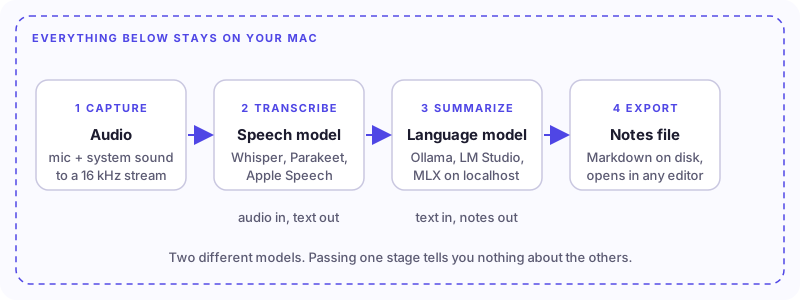
Keep this picture in mind, because the rest of the guide follows it. Capture comes first, then the speech model, then the language model, then export.
Check your Mac before you download anything
Almost any Mac made since late 2020 with an Apple Silicon chip (M1 or newer) can run a modern speech model comfortably. Intel Macs can run some of the tools, but they are much slower, and several of the on-device engines below are Apple Silicon only. Open Apple menu, then About This Mac, to see your chip and memory.
| Your Mac | What to expect | Sensible choice |
|---|---|---|
| M1 to M4, 8 GB | Speech models run fine. Summary models must stay small. | whisper small or turbo, 1 to 3B summary model |
| M1 to M4, 16 GB | The comfortable middle. Run speech and a mid-size model together. | large-v3-turbo, 7 to 8B summary model |
| Pro, Max or Ultra, 32 GB+ | Headroom for long calls and larger summary models. | Any speech model, 12B+ summary model |
| Intel Mac | Works, but slowly. Some engines are unavailable. | whisper.cpp with a small or base model |
An installer that runs and a speech engine that runs offline are separate requirements. Before choosing a tool, confirm that the specific model path you want supports your chip and macOS version.
The speech models worth knowing in 2026
Whisper started the local transcription era, and it is still the safest default. It is no longer alone, though. Here is the field as it stands.
Whisper (OpenAI). Released in 2022 under the MIT license. An encoder-decoder transformer trained on roughly 680,000 hours of multilingual audio. It transcribes around 100 languages and can translate to English. The weights are open, which is why an ecosystem of local runners exists around it.
Parakeet (NVIDIA). A fast model family aimed mainly at English and European languages. On Apple Silicon it is very quick and tends to avoid the invented phrases Whisper can produce during silence. It covers fewer languages.
Apple Speech. Apple ships its own on-device recognizer in macOS. It needs nothing extra to download in many cases, but the newest features require recent macOS versions and Apple Silicon.
SenseVoice and Qwen3-ASR. Strong options for Chinese, Japanese, Korean and Cantonese, where general models are weaker.
| Model | Languages | Speed on Apple Silicon | Best for |
|---|---|---|---|
| Whisper large-v3-turbo | 100+ | Roughly 10 to 15x real time | The best all-round default |
| Whisper large-v3 | 100+ | Several times slower than turbo | Hardest audio, maximum accuracy |
| Whisper small | 100+ | Fast, small download | 8 GB Macs and quick drafts |
| Parakeet v3 | 25 European | Often 50x real time or more | English-heavy meetings, fast turnaround |
| SenseVoice | zh, ja, ko, yue, en | Very fast | East Asian languages |
For most people the answer is Whisper large-v3-turbo. It keeps the large model encoder but cuts the decoder from 32 layers to 4, so it runs far faster with accuracy close to the full model. Choose Parakeet when your meetings are in English and you care about speed, and choose a regional model when your language is not well covered by the general ones.
How accurate is local transcription?
On clean English speech, the large Whisper models land at a word error rate of roughly 5 to 8 percent. That means about one word in fifteen or twenty is wrong. Real meetings are messier than benchmarks. Background noise, crosstalk, heavy accents and people talking over each other all push the number up.
Three failure modes matter most for meeting notes.
Numbers and names. Version numbers, prices, tier names and unusual surnames are where speech models slip. A transcript that says "the 12 dollar plan" when the speaker said "the 120 dollar plan" is a real problem in a sales or finance call.
Hallucination during silence. Whisper decodes one token at a time, and during long silent stretches it can invent repeated phrases or caption-style text. Trimming dead air and enabling its no-speech threshold reduces this.
Speaker labels. Plain Whisper produces one block of text with no indication of who said what. Diarization is a separate step, covered below.
The practical rule is simple. Treat a local transcript as a strong first draft. Check names, numbers, decisions and deadlines against the recording before you rely on a note, especially for anything you will send to someone else.
Four ways to run a transcription model on a Mac
There is no single right way. The best route depends on whether you work with files or live calls, and whether you like a terminal.
| Route | Cost | Privacy | Setup effort |
|---|---|---|---|
| Hosted API | Per audio minute | Audio is uploaded | API key and some code |
| whisper.cpp or faster-whisper | Free | Fully local | Terminal, about 15 minutes |
| Native Mac app | Free or one-time fee | Fully local | Download and click |
| Roofle | Free and open source | Speech runs on your Mac | Download, grant permissions |
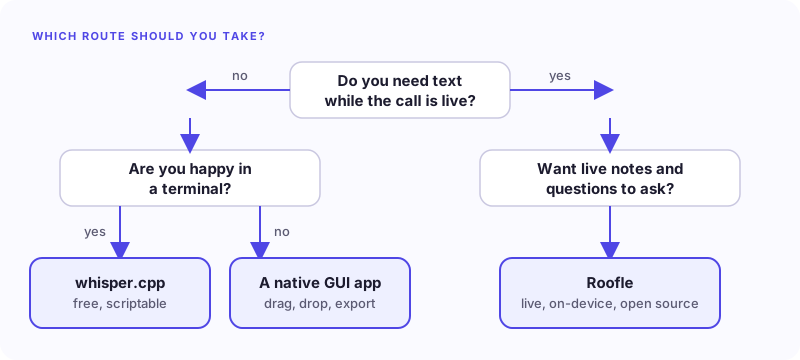
Route 1: whisper.cpp from the terminal
whisper.cpp is a C++ port of Whisper built for speed on consumer hardware. On Apple Silicon it uses Metal for the GPU, and an optional Core ML build pushes the encoder onto the Neural Engine. It is free, scriptable and easy to automate.
Install the tools first. ffmpeg converts almost any audio or video file into the format Whisper expects.
brew install whisper-cpp ffmpegNext, download a model. The large-v3-turbo file is about 1.6 GB. If you have a base 8 GB machine, start with the small model, which is roughly 466 MB.
mkdir -p ~/whisper-models
curl -L -o ~/whisper-models/ggml-large-v3-turbo.bin \
  https://huggingface.co/ggerganov/whisper.cpp/resolve/main/ggml-large-v3-turbo.bin
Whisper wants 16 kHz mono audio. Convert your recording, then transcribe it.
ffmpeg -i meeting.m4a -ar 16000 -ac 1 -c:a pcm_s16le meeting.wav
whisper-cli -m ~/whisper-models/ggml-large-v3-turbo.bin \
  -f meeting.wav -otxt -osrt -l auto
This writes a plain text transcript and an SRT file with timestamps next to your audio. The `-l auto` flag detects the language, and `--translate` produces English output from foreign-language audio.
Core ML for extra speed. For the Neural Engine, download the matching Core ML encoder from the same model repository and place it beside the model file. whisper.cpp picks it up on its own. The first run compiles it, which takes a few minutes, and later runs reuse the cached result.
Picking a size. Use large-v3-turbo as the default. Drop to medium for clean, podcast-quality audio, and to small on a memory-limited Mac. Skip tiny and base for anything that matters, because the error rate climbs quickly.
Route 2: a native Mac app
If a terminal is not your idea of a good time, several native apps wrap the same engines in a normal window. You drag an audio or video file in, pick a model, and get a searchable transcript with timestamps that you can export as text, subtitles or Markdown. The models download once and then run offline.
This is the right answer for most people who transcribe recordings occasionally. You pay nothing or a one-time fee, and you never think about the plumbing. The trade-offs are that most apps work on files after the fact, and the extras you get, such as system audio capture or speaker labels, vary by app and price tier.
Route 3: Roofle for live calls
Files are one use case. The other is a live conversation, where you want text as it happens. Roofle is a free, open-source meeting copilot for your Mac. It captures your microphone and the call audio, transcribes on your device, keeps live notes, and suggests questions you could ask while the topic is still open.
Speech to text runs on your Mac, so there is no transcription bill. You pick the model that writes notes and suggestions, and that can be a local one. See how privacy works for what stays on your device, and what Roofle costs for the full picture. If you want to understand why live support matters beyond a summary, read why AI meeting notes are not enough.
Capture the audio properly
Before you blame a speech model for a bad transcript, listen to the recording. If the other side of the call is missing from the audio, no model will fix that. Capture is the most common point of failure.
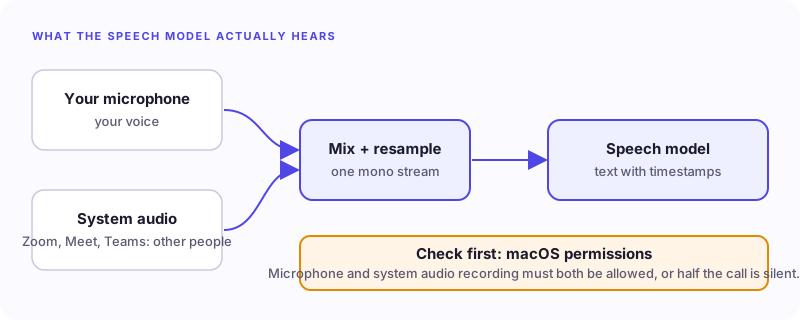
A meeting has two audio sources. Your microphone carries your voice. The other participants come out of your speakers or headphones, and that is system audio. To transcribe both, your tool has to record both.
Grant the permissions. macOS asks for microphone access and, separately, for permission to record system audio or screen content. If either is denied, half the conversation is silent. Check System Settings, then Privacy and Security.
Use a loopback driver if your tool needs one. Some tools capture system audio directly. Others rely on a virtual device such as BlackHole that routes output back in as an input. Check what your tool expects before you start.
Record your device setup. A laptop microphone with built-in speakers is a different configuration from Bluetooth headphones or an external audio interface. If something works in one setup and fails in another, you want to know which.
Get consent. If you record other people, tell them. Say it out loud at the start of every call. Laws on recording vary by place, and the courtesy matters regardless.
Add notes with a local language model
A transcript is raw material. To get decisions, owners and action items, you need a language model to read it. Running one locally keeps the text on your machine as well.
The easiest way is Ollama, which runs open models and exposes an OpenAI-compatible API on localhost. Install it, pull a model, and you can point many tools at it.
brew install ollama
ollama serve &
ollama pull qwen2.5:7b
Which model fits depends on your memory. Larger models write better summaries and pick out owners and dates more reliably, but they load slowly and need more room.
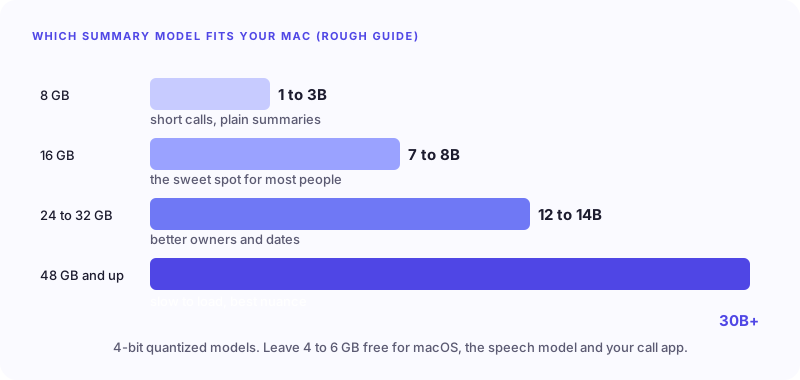
Leave four to six gigabytes free for macOS, the speech model and your call app. If summaries crawl or the system starts swapping, go down a size.
A one-command pipeline. If you work with files, you can chain everything into a single script. Audio goes in, Markdown minutes come out, and nothing touches a server.
#!/bin/zsh
# usage: ./notes.sh recording.m4a
ffmpeg -i "$1" -ar 16000 -ac 1 -c:a pcm_s16le /tmp/audio.wav -y
whisper-cli -m ~/whisper-models/ggml-large-v3-turbo.bin \
  -f /tmp/audio.wav -otxt -of /tmp/transcript
ollama run qwen2.5:7b "Summarize this meeting transcript into: \
1) key decisions, 2) action items with owners, 3) open questions. \
If a task has no owner, say so. $(cat /tmp/transcript.txt)" > "$1.notes.md"
The instruction to say when a task has no owner is deliberate. Small models like to fill gaps with a guess, and a made-up owner is worse than a blank.
Make sure it is really offline
Offline is a property of the whole workflow, not of one stage. A single cloud step quietly turns a local setup into a mixed one.
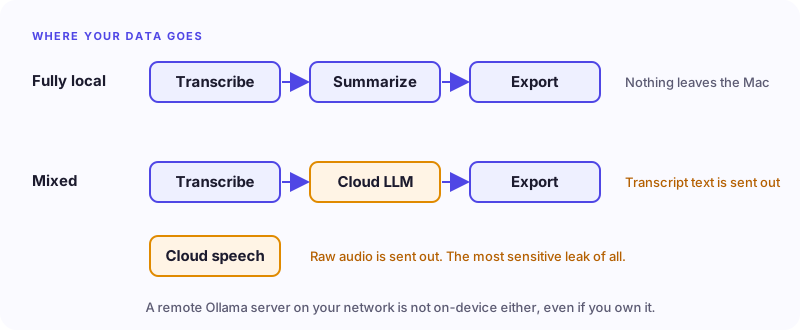
A cloud speech provider receives your raw audio, which is the most sensitive leak. A cloud language model receives the transcript text and any context sent with it. Even a remote Ollama server on your own network is not on-device processing.
Watch for quieter leaks too. Hosted providers, web search, sharing and sync all depend on the network. And check whether your export folder is synced by iCloud, Dropbox or another service. A transcript generated locally can still leave the device when a sync tool copies the file.
The airplane-mode test
Do not take offline on trust. Prepare everything while connected, then disconnect and run a fresh test. Use a new recording instead of reopening an old one, so cached results cannot fool you.
Read this short script aloud into the microphone, and play some authorized call audio through the app you want to capture.
"We approved the pilot for next Tuesday. Maya will prepare the checklist. We rejected the Friday launch. The support handoff still has no owner."
| Check | Pass condition |
|---|---|
| New recording | Both your voice and the playback audio are present |
| New transcript | Text is generated while disconnected |
| New summary | It comes from the local model you selected |
| Meaning | The decision, the rejection, the owner and the missing owner stay distinct |
| Export | The file opens without any hosted workspace |
If a step fails, write down which one. "Offline did not work" is nearly impossible to debug. "Capture worked, but the summary model was not downloaded" takes a minute to fix.
Troubleshooting common problems
| Symptom | Likely cause | Fix |
|---|---|---|
| Only your voice appears | System audio is not captured | Grant the system audio permission, or route output through a loopback device |
| Empty or garbled transcript | Wrong sample rate or format | Convert to 16 kHz mono WAV with ffmpeg |
| Repeated phrases in quiet parts | Whisper hallucinating on silence | Trim silence, raise the no-speech threshold, or try Parakeet |
| Slow or frozen summary | Model too large for your memory | Pick a smaller model or close other apps |
| Wrong names or numbers | Acoustic ambiguity | Check against the recording and correct by hand |
| Summary invents an owner | Small model filling gaps | Tell it to leave unowned tasks unassigned, or use a bigger model |
What about speaker labels?
Plain Whisper does not tell you who is speaking. If you need "Speaker 1" and "Speaker 2", you add diarization, which is a separate model. Some apps include it, and open-source projects such as WhisperX add it using pyannote, though that is a Python project rather than a one-liner.
For a call with two or three distinct voices, a rough label is often enough. For a panel interview where attribution matters, plan for manual review, and always keep the audio.
Privacy, consent and who this is for
Local transcription matters most when the content is sensitive. Lawyers, clinicians, journalists, recruiters and anyone under an NDA have good reasons not to upload recordings to a third party. With a local model there is no server and no data processing agreement to negotiate, because nothing is processed anywhere but your Mac.
It also suits everyday roles. Sales teams can keep customer calls private, recruiters can review interviews without sharing candidate audio, and founders can record research calls without a subscription. Whatever your role, tell people when you record, and follow the rules where you live.
Frequently asked questions
Can I run a transcription model on a Mac without internet? Yes. Once the model file is on your disk, nothing needs the network. Download models while connected, then verify with airplane mode.
Do I need a GPU? No. Apple Silicon has a capable GPU and Neural Engine built in, and the tools above use them. Older Intel Macs work but are slow.
Is Whisper free? The model is free and open source under the MIT license. Running it through whisper.cpp costs nothing. Hosted APIs charge per minute, and some native apps charge a small one-time fee.
Which model should I start with? Whisper large-v3-turbo on a 16 GB Mac, or Whisper small on 8 GB. Try Parakeet if your meetings are in English and you want more speed.
Can it transcribe a live Zoom or Meet call? Yes, if your tool captures system audio. Roofle does this on your Mac and transcribes as people talk.
Are local summaries as good as ChatGPT or Claude? Small local models are good enough for decisions and action items on short calls, and they drop details more often. Larger local models close much of the gap. Cloud models still lead on long, nuanced meetings. See what Roofle costs for the trade-off.
How long does a one-hour meeting take? On a recent Apple Silicon chip with large-v3-turbo, expect roughly four to six minutes, with Parakeet faster. Summaries add a few minutes, depending on the model.
Keep your working configuration
Once everything works, write down your setup: macOS version, chip, speech model, summary model and audio devices. When you update any one of them, rerun the short airplane-mode test. Ten seconds of checking beats discovering a problem halfway through an hour-long call.
Get started
Pick the route that fits you, run the test script once, and you will have a private transcription setup in about fifteen minutes. If you want live notes and suggested questions on top, download Roofle, connect a model with the setup guide, and follow the quick start.