
Overview
How Roofle uses a model
Transcription happens on your Mac and needs no model. Roofle uses an AI model for: live notes, suggested questions and follow-up actions. Transcript text is sent straight to the provider you choose. Roofle has no server in between.
- Any gateway. If it exposes an OpenAI-compatible endpoint, paste its base URL and it works.
- Any model. Roofle does not lock you to a list. Type the model name your provider expects.
- Local models work too. Point Roofle at a model on your own machine and nothing leaves it.
Setup
The three settings
Open Settings, then LLM Configuration, and fill in three fields.
| Field | What to enter |
|---|---|
| Base URL | The gateway endpoint, usually ending in /v1. See the table below. |
| Model | The model name exactly as your provider spells it, for example gpt-4o-mini. |
| API key | Your key for that provider. Use Show to check what you typed. |
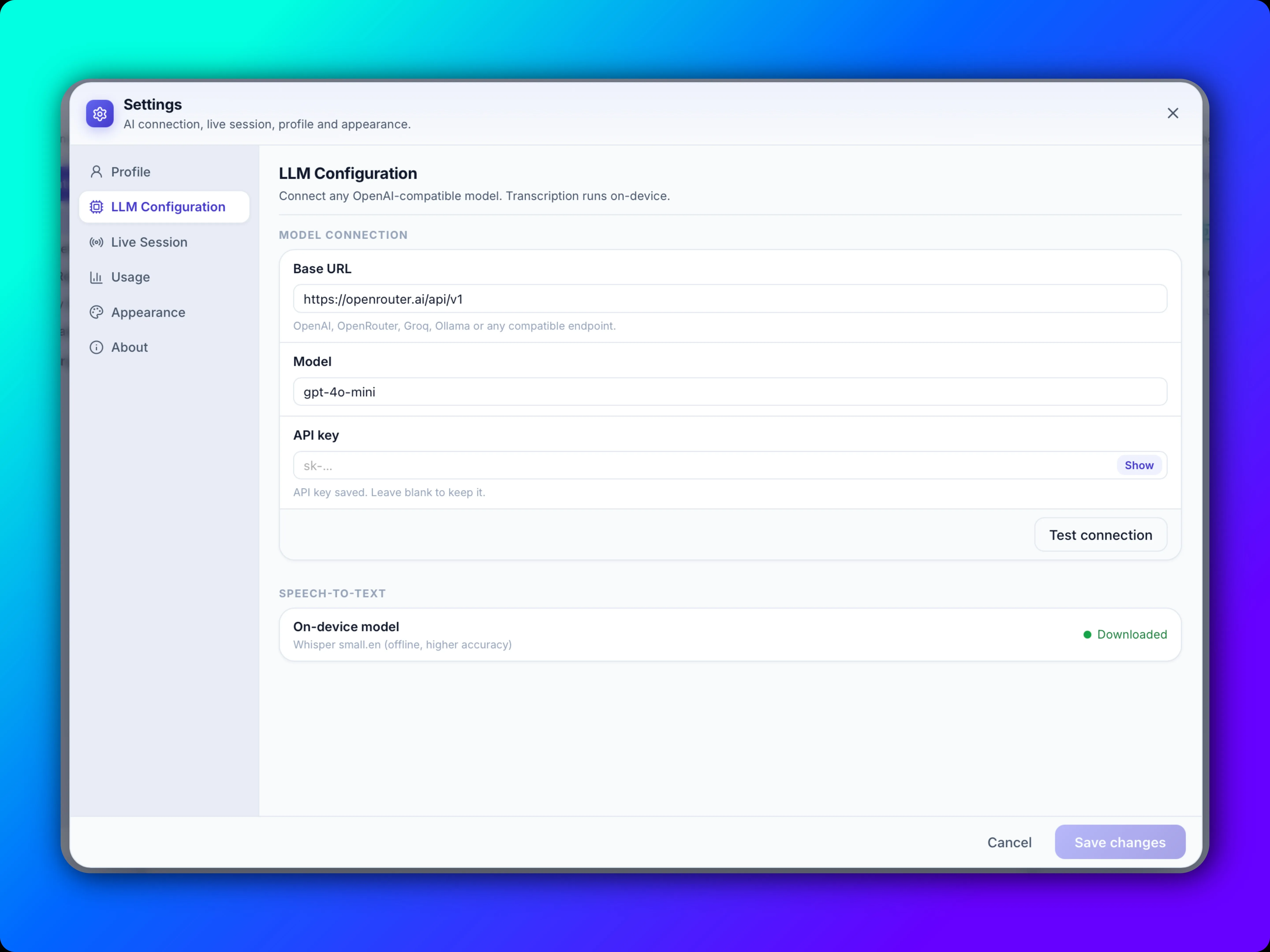
Then run the connection test. It confirms the URL, model and key work before your first call.
Reference
Common gateways and base URLs
Copy the base URL for your provider. Providers change endpoints from time to time, so check their docs if a test fails.
| Gateway | Base URL | Key |
|---|---|---|
| OpenAI | https://api.openai.com/v1 | OpenAI API key |
| OpenRouter | https://openrouter.ai/api/v1 | OpenRouter key |
| Groq | https://api.groq.com/openai/v1 | Groq key |
| Together AI | https://api.together.xyz/v1 | Together key |
| Fireworks AI | https://api.fireworks.ai/inference/v1 | Fireworks key |
| Mistral | https://api.mistral.ai/v1 | Mistral key |
| DeepSeek | https://api.deepseek.com | DeepSeek key |
| Google Gemini | https://generativelanguage.googleapis.com/v1beta/openai/ | Gemini API key |
| LiteLLM proxy | http://localhost:4000 | Your proxy key |
| Ollama (local) | http://localhost:11434/v1 | None needed |
| LM Studio (local) | http://localhost:1234/v1 | None needed |
| llama.cpp server (local) | http://localhost:8080/v1 | None needed |
Using a company gateway or another provider not listed? Ask for its OpenAI-compatible base URL and use that.
Example
Using OpenAI
Create a key at platform.openai.com/api-keys, set the base URL to https://api.openai.com/v1, pick a model and paste the key. Keep the key private, and if it leaks, delete it on the OpenAI dashboard and create a new one.
Example
Using a local model
A local model keeps everything on your Mac. Transcription is already on-device, so with a local model no meeting content leaves your machine.
With Ollama
brew install ollama
ollama pull llama3.1
ollama serveThen in Roofle, set Base URL to http://localhost:11434/v1 and Model to llama3.1. Local servers do not check the key. If the field will not stay empty, enter any placeholder such as local.
With LM Studio or llama.cpp
Start the local server in the app, copy the address it shows (see the table above), and use the model name it lists.
Recommendation
Which model to choose
Roofle makes frequent, short requests during a call, so speed and cost matter more than the largest model. A small, fast model is the right starting point.
| Goal | Recommended | Why |
|---|---|---|
| Default for most people | gpt-4o-mini | Fast, inexpensive and good enough for notes and questions. |
| Higher quality notes | A larger model from your provider | Better judgement on subtle gaps, at higher cost and some added delay. |
| Lowest latency | A small model on Groq or similar | Questions appear sooner after the words are spoken. |
| Fully private | A local model such as llama3.1 | Nothing leaves your Mac. Use a recent Apple Silicon Mac. |
Start with the default, then change only if you notice a problem. You can switch models at any time, and the connection test tells you straight away if the name is wrong.
Help
If the connection test fails
| Symptom | What to check |
|---|---|
| Unauthorized or invalid key | Re-paste the key with Show on. Make sure it belongs to the gateway in the Base URL. |
| Model not found | Copy the model name from your provider exactly. Names differ between gateways. |
| Cannot connect | Check the Base URL, including /v1. For local models, confirm the server is running. |
| Works, but notes are slow | Use a smaller or faster model, or raise Notes update interval under Live session. |
More in Troubleshooting.